Put your studio's name and logo on the listening page
New in 1.0.19 — currently in beta. Your client opens the link and sees your studio, not just ours. Nothing to install: you set it up on the web and it applies to your next session.
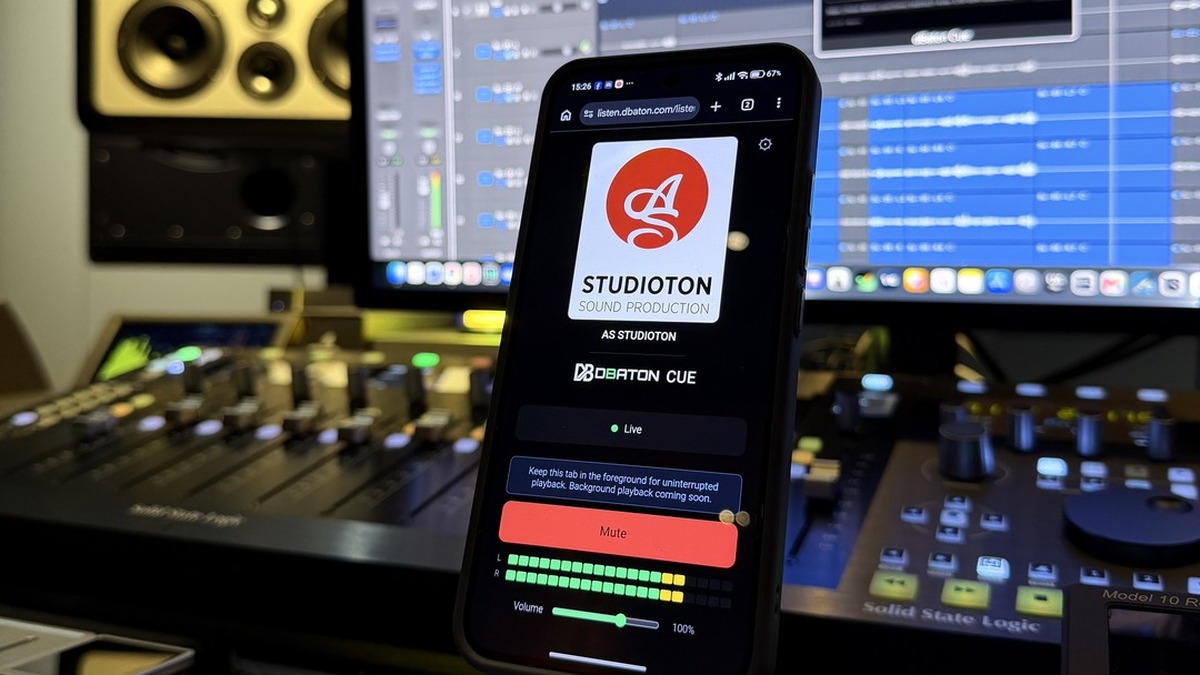
Your logo, your studio name, or both, at the top of the listening page — above the dBaton CUE mark, which steps back to make room. It takes about a minute to set up and you only do it once: every link you share from that licence carries it.
Setting it up
Go to dbaton.com/cue/purchases and enter the email you used at checkout. You'll get a secure link by email — no password, and it's valid for 15 minutes.
It's at the bottom of your licence, under the billing section. Pick one of four options:
- None — the page stays as it is today.
- Name — just your studio name, up to 40 characters.
- Logo — just your logo, no text.
- Logo + name — both.
PNG, JPEG or WebP, up to 512 KB. We recommend 600 × 600 px. It's displayed at 290 px, and uploading exactly that size looks soft on the high-resolution screens most people use — so send us double and let the browser scale it down.
A transparent background looks best, because the listening page is dark. If your logo is dark, or is a JPEG with a white background, tick "Place my logo on a white background": it sits your logo on a clean white panel instead of leaving it invisible or looking like a cut-out sticker.
The preview below the controls is the real page at real size — what you see there is what your client gets. Tick the responsibility box and press Save.
Things worth knowing
Not to a session that's already running. Stop and start your stream and it's there.
It has to be yours, or something you have the rights to use. No trademarks that aren't yours, nothing unlawful. The full wording is in section 15 of our Terms. We can remove anything that breaks it.
Come back to the same page any time. Remove takes the logo off and keeps the name; None clears everything.
It works, and it's live for every licence right now. We're still refining how it looks, so if something renders oddly with your logo, tell us at support@dbaton.com and send the file — that feedback is exactly what we want at this stage.